Colorize AWS CloudWatch Logs
Colorize AWS CloudWatch Logs is a Chrome extension developed by Mustafa İlhan. This free extension is designed to enhance the log viewing experience on AWS CloudWatch. It provides visual grouping of logs and offers several features to make log analysis easier.
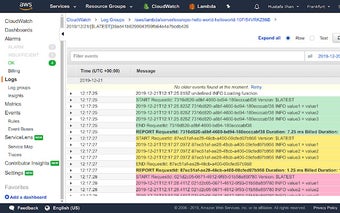
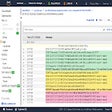
With Colorize AWS CloudWatch Logs, you can set different background colors for each log group of AWS Lambda invocation. This allows you to easily distinguish the beginning, body, and end of the logs for the same invocation. Additionally, lines containing the keywords `REPORT`, `[ERROR]`, and `[Error` are displayed in bold font weight, making it simple to identify important information.
The extension also supports colorizing ANSI terminal codes in the logs, improving readability. Furthermore, it offers two additional functionalities for a better log viewing experience: switching to fullscreen mode and automatically refreshing the logs periodically to load new items.
Colorize AWS CloudWatch Logs is focused on privacy and does not collect any user or webpage information. It only runs on the AWS CloudWatch Logs web page and is free to use. The overhead of the extension is minimal, with the colorize operation taking approximately 7 milliseconds and the listen operation for new event logs taking just around 0.5 milliseconds per second.
Contributions to the extension are welcome, and interested individuals can visit the project page on GitHub for more information. The latest release log includes updates such as enabling font override on the new UI, handling the new UI changes, case-insensitive error line search, and the addition of "Fullscreen" and "Follow tail" buttons. The extension also improves performance and updates the logo in previous versions.
Colorize AWS CloudWatch Logs is a valuable tool for developers and users working with AWS CloudWatch, providing enhanced log visualization and improved analysis capabilities.